
Wrap up Web can provide embedded customised Social Media Feeds on your website.
In some cases it is necessary to display the Wrap up Web Social Media account Feed by default in order to configure this feature.
This is because the display of certain Social Media Feeds connected to such as Facebook or Instagram only allow an embedded Feed display from a Social Media account you manage.
In order to replace the Wrap up Web Feed with your own Feed Wrap up Web will need manager access to your Facebook Page (NOT your Facebook personal account).
Please follow the relevant instructions below to allow Wrap up Web so display your Social Media Feed.
Please ensure you are signed in to the relevant personal Facebook account that manages the Page you want to display a Feed for.
- Login to your personal Facebook Account
- Switch to the relevant Profile(Page) in order to manage it by clicking your profile picture top right and selecting the Profile(Page)
- Once selected, again click your profile picture in the top right
- Click ‘Settings and privacy’ then select ‘Settings’
- In the left menu, click ‘Page setup’
- Click ‘Page access’
- To the right of the heading ‘People with Facebook access’ click the ‘Add New’ button
- Click ‘Next’
- Search for and select the person you wish to give access to. In this case it is ‘Richard Wootton’

- Once selected you will see the following statement. Do NOT enable ‘Allow this person to have full control’
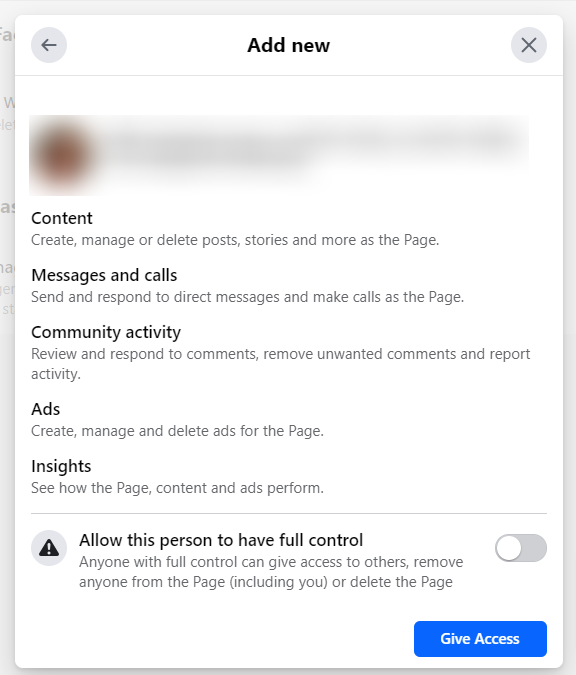
- Press the ‘Give Access’ button
- You will be asked to enter your FB Password to confirm this decision
- Wrap up Web will now receive an invitation to manage the page and have 31 days to accept it
- Please tell us you have completed the above so we can expect the invite
- After invitation has been accepted Wrap up Web will be able to change the Facebook Feed from Wrap up Web to your own Feed
Coming soon…
