
At times it may be necessary for Wrap up Web to gain remote access to your PC/Laptop to help with support requests.
This is done using a free app called ‘MSP 360’
- Visit https://www.msp360.com/cloudberry-backup/download/cbra/
- Scroll down past the heading ‘Download Remote Desktop Software for Windows’, and past the ‘Submit’ button under the form fields. DO NOT compete the form and press the ‘Submit’ button
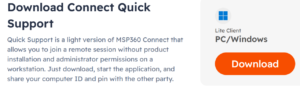
- After scrolling down you will see a heading Download Connect Quick Support
- Click the orange Download button the the right of this heading
- The software will download to your device
- Install the software to your device
- When installation is completed open the ‘MSP360 Connect’ application
- You will see a Computer ID and a PIN
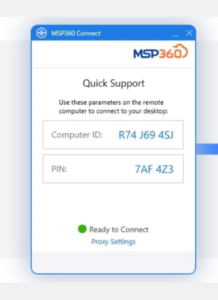
- When a support call is underway please provide your Computer ID and PIN to Wrap up Web support so they can remotely gain access to your device
